School Routines
Scroll down to see our school procedures.
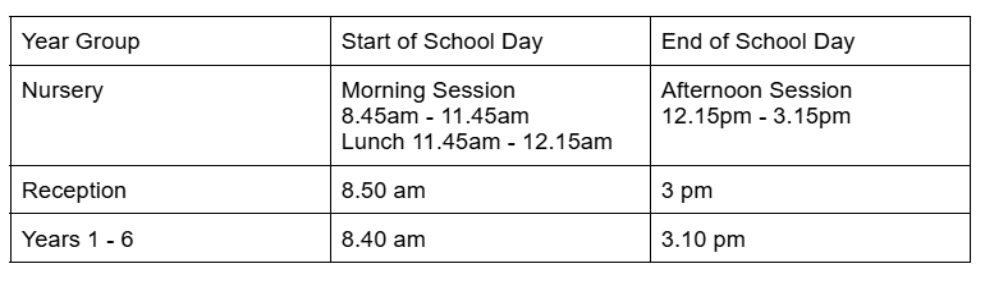
What are the timings of the school day?
What time do the playground gates open?
-
During the morning, gates will be opened at approximately 8.35am and children go straight to classes at 8.40am.
-
During the afternoon, gates will be opened at approximately 2.50pm and closed at 3.20pm.
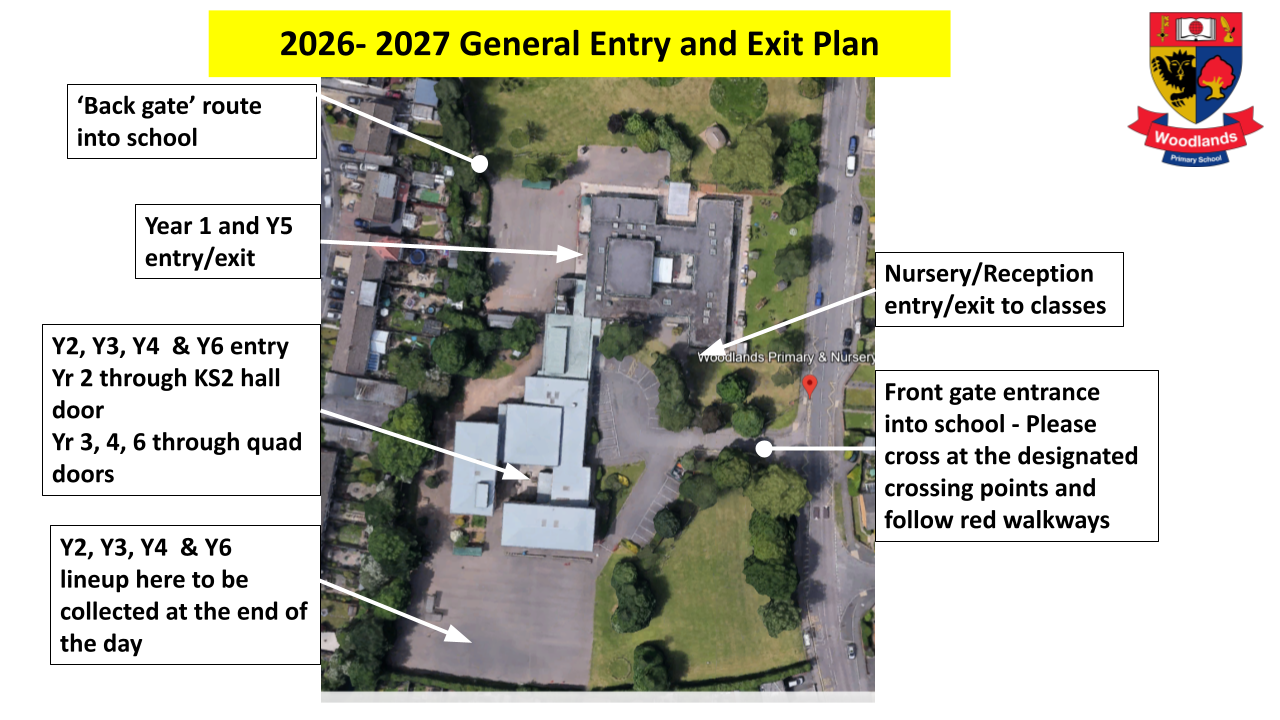
How does my child enter/ exit school each day?
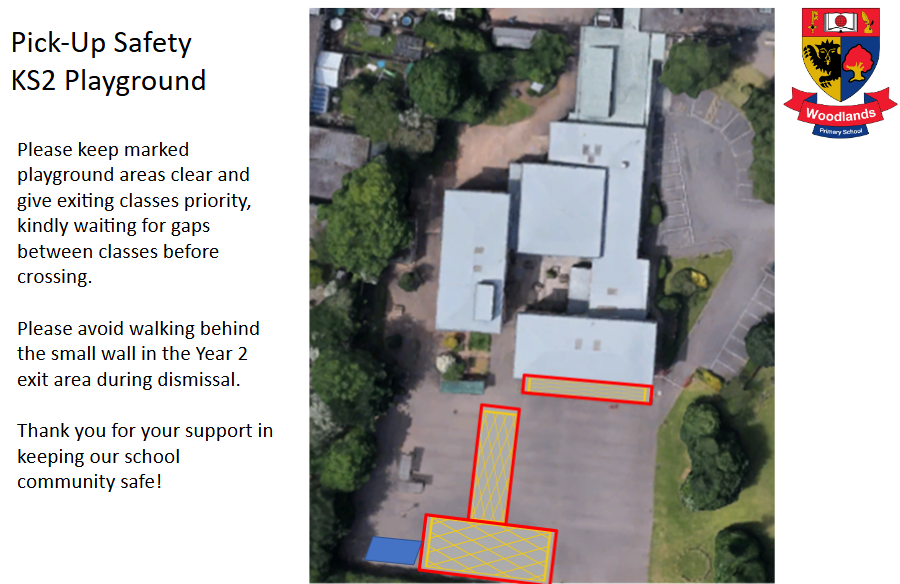
How can we help keep pick-up time safe and calm?
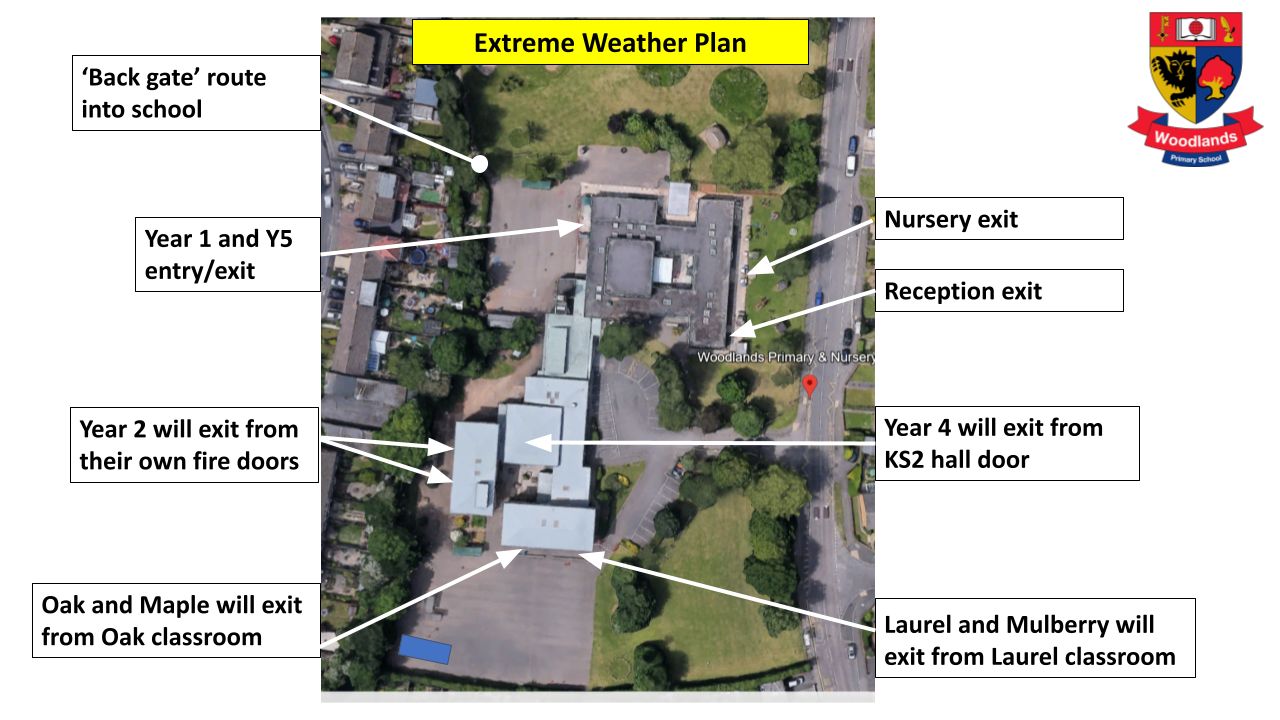
What if there is extreme weather?
If we have extreme weather (heat/ wind/ rain) these are our adjusted procedures.
What is the dismissal procedure at the end of the day?
-
Years Reception through Year 4: Children must be collected directly from their designated dismissal areas by a parent, carer, or named person authorised by the family.
-
Years 5 and 6: Pupils are only permitted to walk home independently if the school has received written permission from a parent or carer in advance.
-
Unaccompanied Pupils: Any child in Year 5 or 6 without a signed permission form on file will not be allowed to leave the school grounds unaccompanied and must be collected.
-
On dismissal, you may be required to provide a password if the member of staff does not recognise you.
If you have a child in Year 5 or 6 and wish for them to walk home independently—or to meet you at a designated spot off-site—please contact the school office in writing so that the child’s permission can be updated on our system.
If you have already provided written permission for this academic year, you do not need to resubmit unless your child's end-of-day arrangements have changed.
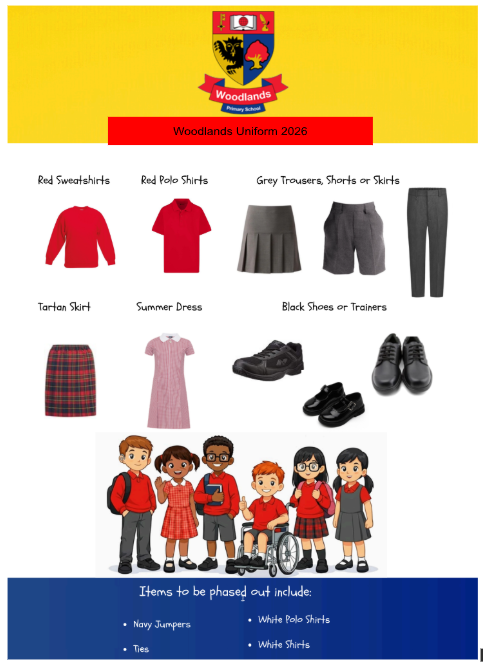
What should my child wear to school?
How do I order and pay for school meals?
Login to your child’s MCAS and follow the instructions below:
For making meal selections
-Log into the MyChildAtSchool (MCAS) portal or app.
-Navigate to the "My Child" or "Dinner" section.
-You will see the available dinner menu. Select the meal choices for the desired dates.
-Confirm your selections.
How do I ensure school can contact me?
The My Child At School (MCAS) app allows you to view your child's information from school, including academic reports and school announcements. It also contains essential information such as emergency contacts and addresses. This app is also used to set your parental permissions for your child in regards to photographs, videos, trips and more. Please check that their permissions and contact information is up to date and accurate. Should there need to be any alterations parents will need to contact the school office in writing.
What is the school policy for children bringing phones to school?
Mobile Phone Policy (Year 5 & Year 6)
In line with national guidance to ensure a screen-free learning environment, mobile phones are only permitted for Year 5 and Year 6 pupils whose parents have requested it for safety during their journey to and from school.
Daily Procedure:
-
Power Off: Devices must be turned off before entering school grounds and placed inside their bags..
-
Hand In: Pupils give their phone directly to their class teacher upon entering the classroom.
-
Secure Storage: Devices are locked away safely for the duration of the school day.
-
End of Day: Teachers return the powered-down phones to pupils at dismissal.
-
Any breaches to this approach will result in the schools behaviour policy being applied and parents may be required to collect the phone from site.
Pupils in Reception through Year 4 are not permitted to bring mobile phones to school.
What is the school approach to jewellery and hair styles?
Jewellery & Smartwatches
-
Permitted Jewellery: Pupils may wear one pair of small, plain gold or silver stud earrings and a standard wristwatch.
-
Prohibited Jewellery: All other forms of jewellery—including necklaces, rings, bracelets, and extra piercings—are strictly prohibited. Unauthorised items must be removed immediately for safe keeping.
-
Smartwatches & Connected Devices: Smartwatches and mobile phones are not permitted for use at school. All connected devices must be switched off and stored out of sight for the entire school day. Staff have the authority to search for and confiscate these devices if brought out.
Hair & Hair Accessories
-
Hairstyles & Colours: Hair must remain a single, natural colour; dyed, dip-dyed, or unnatural shades are not allowed. Extreme styles (such as shaved design lines/tramlines, Mohicans, or skinhead cuts) are prohibited.
-
PE & Practical Safety: Long hair must be tied securely back during PE lessons and practical activities.
-
Hair Accessories: Accessories should be simple, practical, and unobtrusive. Decorative or oversized items—such as 'Jo-Jo Bows' and animal-ear headbands—should not be worn.
Make-up, Nails & Eyelashes
-
Make-up: Make-up is not permitted.
-
Nails: False nails of any kind, including acrylics, gels, and extensions, are strictly prohibited.
-
Eyelashes: False eyelashes and eyelash extensions are not allowed.
When is my child's PE Day?
Please ensure your child comes to school prepared for PE on their designated day(s) for Term 1.
|
Year Group |
PE Day(s) |
|
Nursery |
Tuesday (No kit change needed) |
|
Reception |
Thursday only (Kit needed once sessions begin) |
|
Year 1 |
Wednesday |
|
Year 2 |
Monday |
|
Year 3 |
Wednesday |
|
Year 4 |
Monday |
|
Year 5 |
Thursday |
|
Year 6 |
Friday |
Year Group Guidance
-
Nursery Clothing: Children in Nursery do not change into a PE kit. Please dress your child in comfortable, safe clothing suitable for active movement, such as joggers or leggings.
-
Reception Start Date: Reception pupils only require a PE kit on Thursdays. PE will not take place during the first few weeks of term; we will notify parents directly as soon as sessions are scheduled to begin.
Key Reminders for Parents
-
PE Uniform: Children in Years 1–6 (and Reception once PE starts) should arrive at school wearing their official PE kit on their designated days.
-
Footwear: Supportive trainers suitable for both indoor and outdoor active sessions are required.
-
Safety: Long hair must be tied back securely. Earrings must be removed at home or covered with tape before arriving at school.
Is my child too ill for school?
We understand that if your child is feeling poorly it can be worrying and you may be uncertain about sending them to school. Always follow NHS guidance here. We strongly encourage you to bring you child to school, unless guidance suggest otherwise. We will always look after your child and contact you if they are too unwell.